
Ham Radio Deluxe® - Best Logging Software for Amateur Radio Operators
Which Ham Radio Logger You Should Use, if You are Active on the Ham Radio Bands?
Ham Radio Deluxe® Logbook is the World's Most Popular Ham Radio Logging Software
HRD Logbook is a QSO Logger with DX Clusters, Operating Awards, & More
The Last Logbook Software You Will Ever Need. Use With WSJT-X or JTDX to log FT8 & FT4 QSOs.
Ham Radio Deluxe® Logbook is the Logger Used by 41,500 Amateur Radio Operators in 130 Countries Worldwide.
Are you a DXer looking for ham logging software? This ham radio logging software for Windows has got you covered.
The ham radio log book is an essential part of amateur radio. Keeping a ham log is made easier with the Ham Radio Deluxe® Logbook. Get off your paper log and onto the best ham radio logging software available!
HRD Logbook is a powerful ham radio QSO logging software program within the Ham Radio Deluxe Software® suite. It is a complete DX log operations center and a fantastic general-purpose logger. With powerful features, HRD Logbook is ideally positioned to be the only and best ham radio logger software you will need.
Logbook is directly integrated with Ham Radio Deluxe® Rig Control to obtain frequency/band and mode for your ham radio equipment by Kenwood, ICOM, Flexradio, Elecraft, and Yaesu radio (and others).
Beginning with a robust database engine, Ham Radio Deluxe® Logbook screams operating convenience. Everything you need is conveniently arranged on one user interface.
Packed with features, this logging software for ham radio is the ideal shack accessory for everyone from the novice rag-chewer to the most accomplished paper-hanger.
It becomes a DXer's best asset. Keep track of all essential amateur contact information in your log with the click of a mouse.
In your log, look up the name, QTH, and other important information about your amateur contacts using various online and offline sources. You can interface with the popular QRZ.com call sign database (subscription required) or a free lookup service.
Logbook also interfaces with DX Spider cluster servers for spotting the rare ones. The Bandmap feature graphically displays spots within a band with up to 10 bands visible simultaneously.
With a mouse click, swing your beam to the DX station’s heading.
Once you have the rare DX in your ham radio log, the integration Logbook of the World (LOTW) is easy. Obtain your callsign certificate from the ARRL, install Trusted QSL (TQSL), and you are ready to upload your QSOs to your ARRL LOTW account. Easy!
Downloading from LoTW is just as simple. Logbook interfaces with many popular electronic logging and electronic QSL services, including eQSL, HRDLog, and ClubLog. Logbook keeps track of many popular awards too.
- DX cluster support for DX Spider, CC Cluster, and AR Cluster (the best DX cluster - WA9PIE-2 DX - cluster supports spots through the reverse beacon network DXSpider commands supported; clisk here on information about "What is DX Cluster? ")
- Auto-population of frequency and mode from radio integration
- Supports HF, VHF, and UHF operating
- Gray line map software included
- Worked Status Indicators (WSI) in DX cluster show you what DX you need to work and confirm
- Over 200 awards supported in 16 awards programs (endorsements); DXCC, IOTA, CQ WAZ, WAS, and more; advanced awards reporting
- Easily import your ham radio logs as an ADIF
- One-click LOTW upload/download
- Never lose a log again. Logbook will automatically backup your log files to your local hard drive or to cloud services like Dropbox, OneDrive, Box, Google Drive, iCloud, and many more.
- Automatic upload and/or download to eQSL, ClubLog, QRZ logbook, HRD Log.net
- Ham Callsign Lookup integration with QRZ.com, QRZ CD, Buckmaster CD, RAC CD, HamCall.com subscription, Callbook.info, HamQTH, QRZcq (call sign lookup)
- Country atlas info via Wikipedia
- Integration to automatically log QSOs from WSJTX, JTDX, and JTAlert for your JT65, FT8, and FT4 digital modes; Logbook will automatically log QSOs into Logbook from popular radio contesting software like N1MM for VHF, UHF, or HF ham contests. (Many other contest loggers are supported. Consult the documentation to see if your contest logging software supports UDP broadcast of QSO data). You don't have to do a WSJT X Download later.
- Integration with Google Earth to lookup DX location
- Able to network and share a single log across multiple stations for real-time logging updates
- Able to record rig audio for playback
- Print labels for QSL cards
- Continually updated solar weather via WWV and WCY
- Bandmap view of DX spots
If you're into QRP radio, you need this to help accelerate your pace towards QRP awards for DXCC and others.
There are great options for remote ham radio with Ham Radio Deluxe® Logbook.
We endorse WSJT-X as the best FT8 software.
Visit our YouTube channel for helpful videos on "Keeping a Log. "
The Ham Radio Deluxe® Logbook Setup can be found in our online manual by clicking here.
There are many choices in ham radio logging programs. You can try Ham Radio Deluxe® free for 30 days.
Quick-Links
Download and Install
YouTube Demonstrations
Software Documentation
User Community Forums
Ham Radio Deluxe® Videos and Screenshot Images
Here's a video that demonstrates how to apply for DXCC awards using Ham Radio Deluxe® Logbook and LOTW.
Here's a video that demonstrates how to use WSJT-X with Ham Radio Deluxe® to log FT4, FT8, and other recent digital modes (using sound cards).
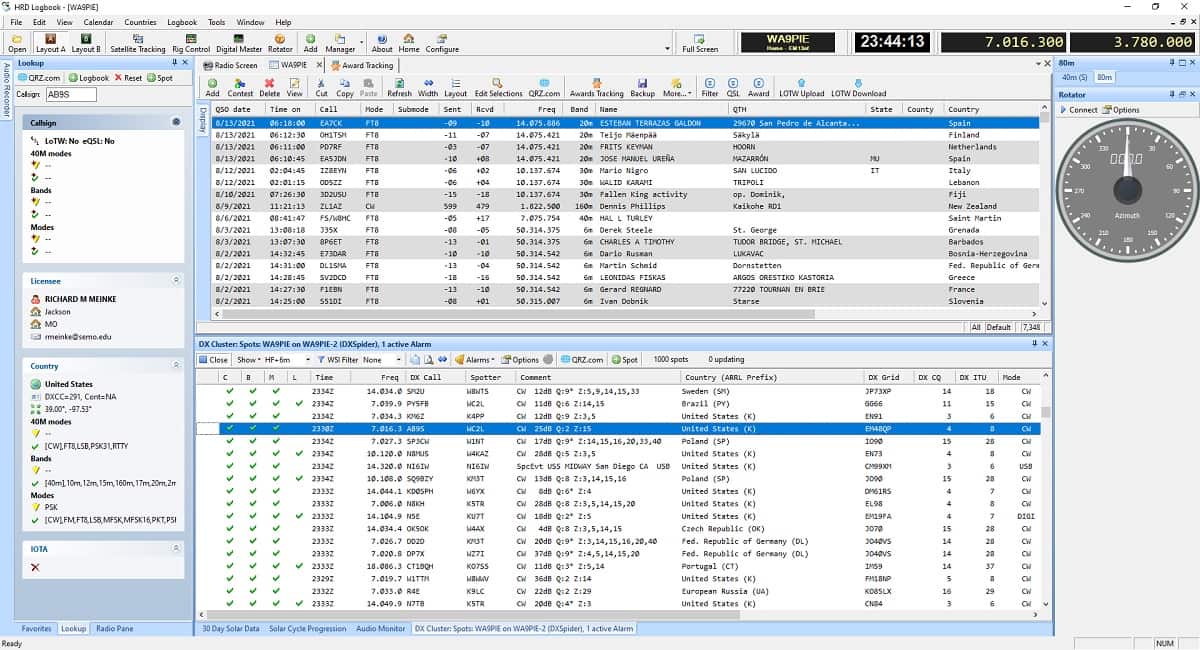
Ham Radio Deluxe® Logbook Main QSO Logging Screen
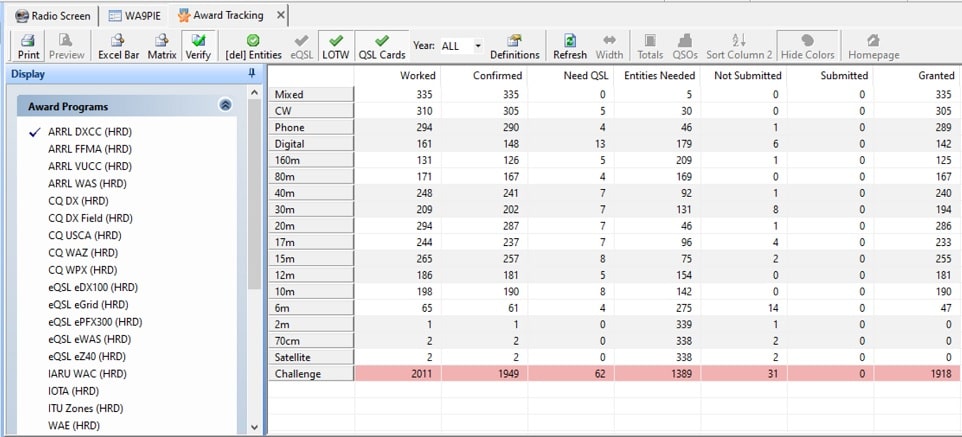
Ham Radio Deluxe® Logbook DX Awards Tracking Totals
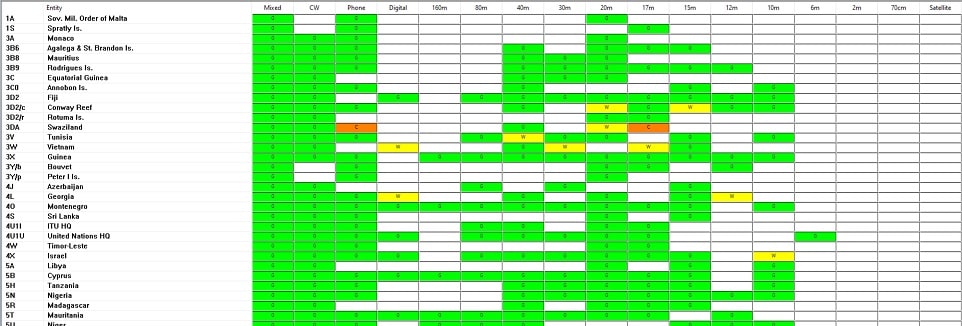
Ham Radio Deluxe® Logbook DX Awards Tracking Matrix
